Introduction
Walk into most district central offices and you'll find the same problem: student data scattered across paper cumulative folders, aging spreadsheets, a patchwork of school-level databases, and whatever system the previous IT director happened to like. A student transfers schools, and someone has to hunt down immunization records, transcripts, and discipline history from three different places.
Student records software fixes this by centralizing information in one governed system. Done right, it improves data accuracy, cuts staff workload, gives families real visibility into their child's progress, and keeps records intact when students move between schools.
This guide compares leading U.S. K-12 student-record platforms and walks through how districts should evaluate privacy, interoperability, usability, scalability, and total cost before signing a contract.
Key Takeaways
- Student records software often centers on an SIS, plus separate tools for enrollment, documents, and health records.
- Look for district-wide governance, role-based access, audit trails, and secure family communication.
- Compare platforms by district size and workflow fit, not feature count.
- Confirm FERPA controls, accessibility, security certifications, and pricing with each vendor.
Overview of Student Records Software for K-12 Districts
Student records software creates, stores, updates, retrieves, and reports on student information: enrollment, demographics, contacts, attendance, grades, schedules, discipline, documents, and program participation. It's the system of record that districts rely on for daily operations and state reporting.
A single tool rarely covers every district need, though. A broad SIS handles the academic and administrative core. Separate platforms often manage:
- Enrollment and registration: online applications, document collection, residency verification
- Document management: transcripts, IEPs, legal records, retention schedules
- Learning management (LMS): coursework, assignments, classroom activity
- Specialized health records: medications, immunizations, nurse visit documentation
District-scale work adds requirements a single-school app never faces:
- Multi-school access controls
- Student transfers between buildings
- State reporting formats
- Longitudinal history that follows a student for 13 years
- Guardian permission tracking
- Formal records-request procedures

Why Districts Are Modernizing Now
Interoperability has become a district priority rather than an IT afterthought. CoSN's 2025 State of EdTech District Leadership survey found that 59% of districts now maintain approved-app lists, up from 42% just two years earlier. That shift shows districts are actively governing which tools touch student data rather than letting integrations sprawl unchecked.
The products below are starting points for evaluation, not a universal ranking. Fit depends on your district's size, workflows, and each vendor's verified 2025 capabilities. Confirm specifics before you buy.
Best Software for Managing Student Records in 2025
Each platform below is scored on the same district-focused criteria:
- Student-record depth and K-12 fit
- Security controls and compliance posture
- Integrations, reporting, and usability
- Implementation support, scalability, and cost transparency
PowerSchool SIS
PowerSchool centralizes enrollment, attendance, grading, and family access in one system, with PowerTeacher Pro handling both standards-based and traditional grading. Administrators can modify SIS pages and add fields without custom development, which helps districts adapt the system to local policy. Scale is the main draw. PowerSchool reports over 20 million active users, 75+ certified integrations, and support for 56 states and provinces, with Ed-Fi and 1EdTech-certified interoperability. A Capterra review from August 2025 gave it a 5.0 overall rating, citing easy implementation and consistent support. The trade-off is real: a large feature set means more configuration decisions upfront, and pricing is not published.
| Category | Details |
|---|---|
| Pricing | Not publicly disclosed — contact vendor |
| Core features | Enrollment, attendance, PowerTeacher Pro grading, family portal |
| Integrations | 75+ certified integrations, Ed-Fi/1EdTech support, custom API partnerships |
| Implementation | Configurable without custom dev; complexity scales with district size |
| Security/compliance | FERPA and COPPA aligned; ISO 27001, SOC 2 certified |
| Best-fit profile | Mid-to-large districts needing a broad, integration-rich ecosystem |
Infinite Campus
Infinite Campus pairs a full SIS with the Campus Parent and Campus Student apps, giving families one place to check grades, attendance, food service balances, fees, and activity registration. The system includes ad hoc reporting, academic planning, special education tools, and a Student Records Exchange feature built specifically for cross-district transfers. Its multi-tier architecture is built to scale. The company states it supports districts from under 20 students to more than 300,000, with over 1,500 core tools available. Infinite Campus also reports serving 10 million students across 46 states and 2,800 districts. Treat those as vendor-reported figures and verify them against references in your state.
| Category | Details |
|---|---|
| Pricing | Not publicly disclosed — contact vendor |
| Core features | Scheduling, gradebook, special education, Student Records Exchange |
| Integrations | Vendor-reported 1,500+ tools; state reporting built in |
| Implementation | Multi-tier architecture supports small charters to statewide deployments |
| Security/compliance | Verify current certifications directly with vendor |
| Best-fit profile | Districts prioritizing transfer continuity and parent-facing mobile access |
Skyward
Skyward's Qmlativ platform combines SIS and ERP functions in one Education Management System. Official materials describe a built-in report writer, customizable templates, field-level customization, and embedded workflow tools. Districts can tailor much of the system without calling the vendor for every change. Skyward states its SIS and ERP products serve more than 1,900 public-sector organizations, from small entities to statewide implementations. Migration support includes custom forms, data validation, and a dedicated migration team, according to its 2023 migration booklet. Reviews are mixed on support speed. One Capterra review called Qmlativ the easiest system to use; a broader Capterra summary noted inconsistent resolution times across tickets.
| Category | Details |
|---|---|
| Pricing | Not publicly disclosed — contact vendor |
| Core features | Attendance, report writer, field-level customization, ERP integration |
| Integrations | Third-party interfaces available; additional costs may apply |
| Implementation | Dedicated migration team; configuration-heavy setup |
| Security/compliance | Verify current documentation directly with vendor |
| Best-fit profile | Districts wanting combined SIS/ERP operations and deep customization |
FACTS Student Information System
FACTS SIS is built around a single source of truth for school and student information, with a Family Portal showing grades, attendance, and tuition balances in one view. FACTS SIS sits in a broader FACTS suite with separate apps for enrollment and tuition/payment plans, so do not assume every module ships bundled together. FACTS reports more than 5,700 K-12 schools on its SIS product and a 97% customer-retention rate. A separate 2026 corporate update puts the broader FACTS base above 12,000 K-12 schools, with a long-standing focus on private and faith-based communities. That focus matters. Public-district and charter proof points are thinner in the available documentation, so large public districts should confirm fit before assuming parity with a public-sector-built SIS.
| Category | Details |
|---|---|
| Pricing | Not publicly disclosed — contact vendor |
| Core features | Real-time family portal, transcripts, historical grades |
| Integrations | Connects with FACTS Enrollment and FACTS Payment Plans |
| Implementation | Vendor-supported onboarding |
| Security/compliance | Verify current certifications directly with vendor |
| Best-fit profile | Private, faith-based, and tuition-driven K-12 schools |
Alma SIS
Alma targets districts that want a modern interface without sacrificing depth. Its feature list covers academic records, transcripts, flexible GPA calculations, standards-based and traditional grading, configurable rubrics, advanced scheduling, and graduation tracking. Custom roles, forms, and reports let administrators adjust workflows without waiting on vendor tickets. Integration support stands out. Alma lists Google Classroom, Schoology, and Canvas connections, 125+ push-button integrations, public APIs, and OneRoster support via API and SFTP. Independent reviews back the usability claim. A March 2025 Capterra review gave it 5.0 for overall rating and ease of use, and a G2 review praised its attendance tools and responsive support team.
| Category | Details |
|---|---|
| Pricing | Not publicly disclosed — contact vendor |
| Core features | Standards-based grading, advanced scheduling, graduation tracking |
| Integrations | 125+ integrations, OneRoster (API/SFTP), Google Classroom, Canvas |
| Implementation | Custom forms/workflows reduce need for vendor customization |
| Security/compliance | Verify current certifications directly with vendor |
| Best-fit profile | Districts prioritizing modern UX and teacher/family adoption |
A Note on Specialized Platforms
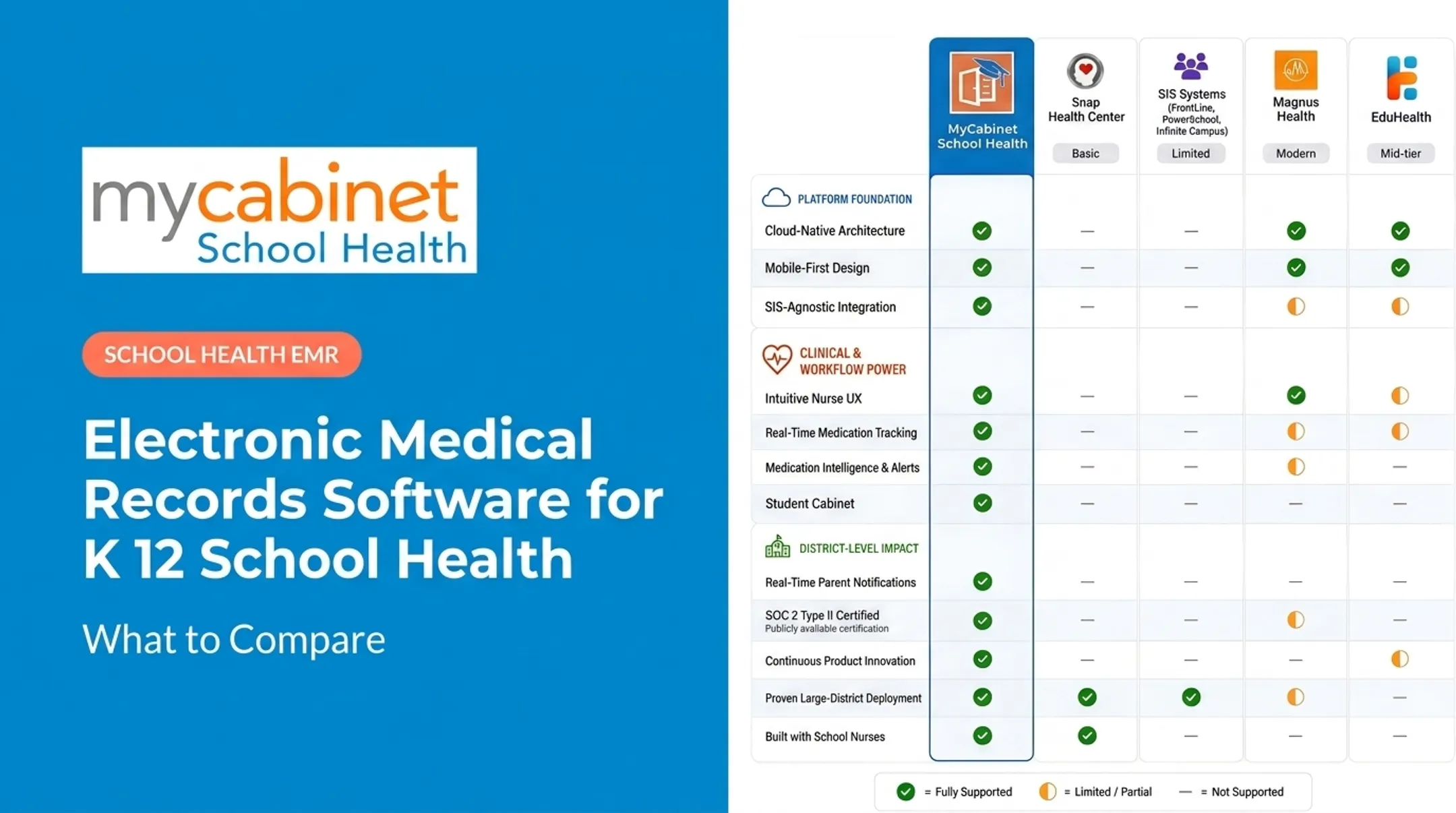
Feature count alone should not decide your stack. A general SIS handles academic and administrative records well. Student health data is different: it needs tighter access controls, audit trails, and nurse-specific workflows, not gradebook permissions reused for clinical care. After you shortlist an SIS, plan how health records will sit beside it. MyCabinet School Health is a specialized complement, not a full SIS replacement. It centralizes clinic visits, medications, allergies, and health forms for school nurse workflows, and connects to your SIS for sync instead of trying to replace the student information system. When you evaluate a health-records tool, verify:
- Medication tracking and expiration alerts
- Digital health-form collection with parent upload and nurse review
- Nurse task management for rechecks and screenings
- Controlled, one-way parent communication
- Role-based access and FERPA-aligned documentation
- Integration requirements with the district's existing SIS

How We Chose the Best Student Records Software
Our comparisons rest on documented vendor capabilities checked against real district operating needs, cross-referenced with independent reviews where available. We separated vendor marketing from verifiable functionality wherever the source material allowed it.
Core Functionality and Privacy Controls
We weighed enrollment, attendance, grading, scheduling, discipline records, transfers, longitudinal history, and district/state reporting as baseline requirements. A system missing any of these is not a full SIS.
Privacy review centered on FERPA obligations. An education record is any record directly tied to a student and maintained by the school or a party acting on its behalf, according to the U.S. Department of Education's guidance.
That means a vendor handling student PII under a school-official exception must stay under the district's direct control. Districts should confirm that detail in every vendor contract, not take it on faith.
We also checked for:
- Role-based, least-privilege access
- Encryption and authentication options
- Audit logs and data retention policies
- Independently verifiable certifications (SOC 2, ISO 27001)
Interoperability and Total Cost
Interoperability matters because districts change vendors more often than they'd like. We looked at API availability, support for Ed-Fi and OneRoster standards, LMS/assessment integrations, and whether a district can actually extract its own data if it switches systems.
Total cost of ownership rarely matches the license quote. Alabama's 2024 statewide SIS RFP outlines the real components districts should budget for beyond software licensing:
- Cloud hosting
- Data conversion and integration builds
- Testing and training
- Ongoing support
- Compliance upgrades
Request a five-year projection, not a first-year number.

Conclusion
Choose the student-record platform that delivers trustworthy data, appropriate access controls, workflows your staff will actually use, and reporting you can trust for state submissions. A long feature list is not the deciding factor.
Before you sign anything:
- Build a requirements matrix specific to your district's size and workflows
- Involve IT, administrators, teachers, counselors, registrars, and nurses in evaluation
- Test real scenarios during vendor demos: a student transfer, a records request, a state report
- Confirm accessibility support for staff and families who need it
If health records are the gap in your current setup, MyCabinet School Health offers a nurse-centered platform for medication oversight, digital health forms, and connected parent communication, built to complement your SIS rather than replace it.
Frequently Asked Questions
What is the best student management system?
It depends on your district's size, required record types, integrations, reporting needs, and implementation capacity. A general SIS handles academic and administrative records; specialized platforms handle domains like health records more thoroughly.
What is the best app for managing tuition classes?
Tuition-class apps typically focus on scheduling, billing, attendance, and class communication. K-12 districts need broader SIS capabilities for official student records, privacy compliance, and multi-school governance that tuition apps don't provide.
What does student records management software do?
It centralizes student data, supports authorized updates and retrieval, automates state and district reporting, maintains audit trails, and connects with related systems like LMS platforms and health-records tools.
How does FERPA affect the choice of student records software?
Districts should assess a vendor's access controls, data-sharing practices, and security safeguards before signing. Confirm legal and policy requirements with district counsel, since FERPA compliance depends on contract terms as much as software features.
Can student records software integrate with an existing SIS or LMS?
Integration varies by vendor and configuration. Verify available APIs, supported data standards like OneRoster, synchronization frequency, and who owns the integration work — the vendor or your IT team.
How much does student records software cost for a school district?
Vendors typically customize pricing by enrollment size, number of schools, modules selected, and contract terms. Request a complete five-year total-cost estimate covering implementation, integrations, and support, not just a license quote.