That's because K-12 school health software solves different problems than a doctor's office EHR. Nurses aren't billing insurance or coding diagnoses. They're managing medication schedules, logging clinic visits, tracking immunizations, and keeping parents in the loop — often across dozens of buildings at once.
This article breaks down what actually drives school health EHR pricing, where the hidden costs hide, and how to budget without getting blindsided mid-year.
Key Takeaways
- Most vendors price by custom quote, so school EHR cost isn't a single flat rate
- District size, parent features, SIS integrations, and compliance needs drive total cost up
- Small campuses often pay more per student; large districts win lower unit rates on bigger contracts
- Parent engagement and medication tracking often pay off through fewer nurse admin hours
How Much Does School Health EHR Software Cost? (Pricing Overview)
School health EHR pricing isn't a fixed formula. It depends on your district's enrollment, the number of nurses and clinic sites, and how much functionality you need beyond basic charting.
SchoolDoc, a school health vendor, publishes a starting price of $425 per month. That page notes final pricing still depends on account size, complexity, and needs, so treat it as a reference point, not a market average.
Common budgeting mistakes districts make:
- Underestimating how much nurse time training actually requires
- Ignoring the cost of parent-communication features until after signing
- Assuming "free" tools like spreadsheets and fax machines carry no real cost (they do, in staff hours and errors)
Typical Cost Tiers
Pricing generally falls into three tiers, though vendors package them differently:
- Basic/entry-level: Simple digital record-keeping, often priced per student or per nurse. Best for very small schools with minimal nursing staff and low visit volume.
- Mid-range: Structured visit documentation, medication tracking, and task management. Best for single schools or small districts that need a real nurse workflow, not only a filing cabinet replacement.
- Comprehensive/district-wide: Full nurse portal, parent-facing app or web portal, digital form collection, audit trails, and FERPA-aligned access controls. Best for multi-school districts that want parent engagement alongside compliance.

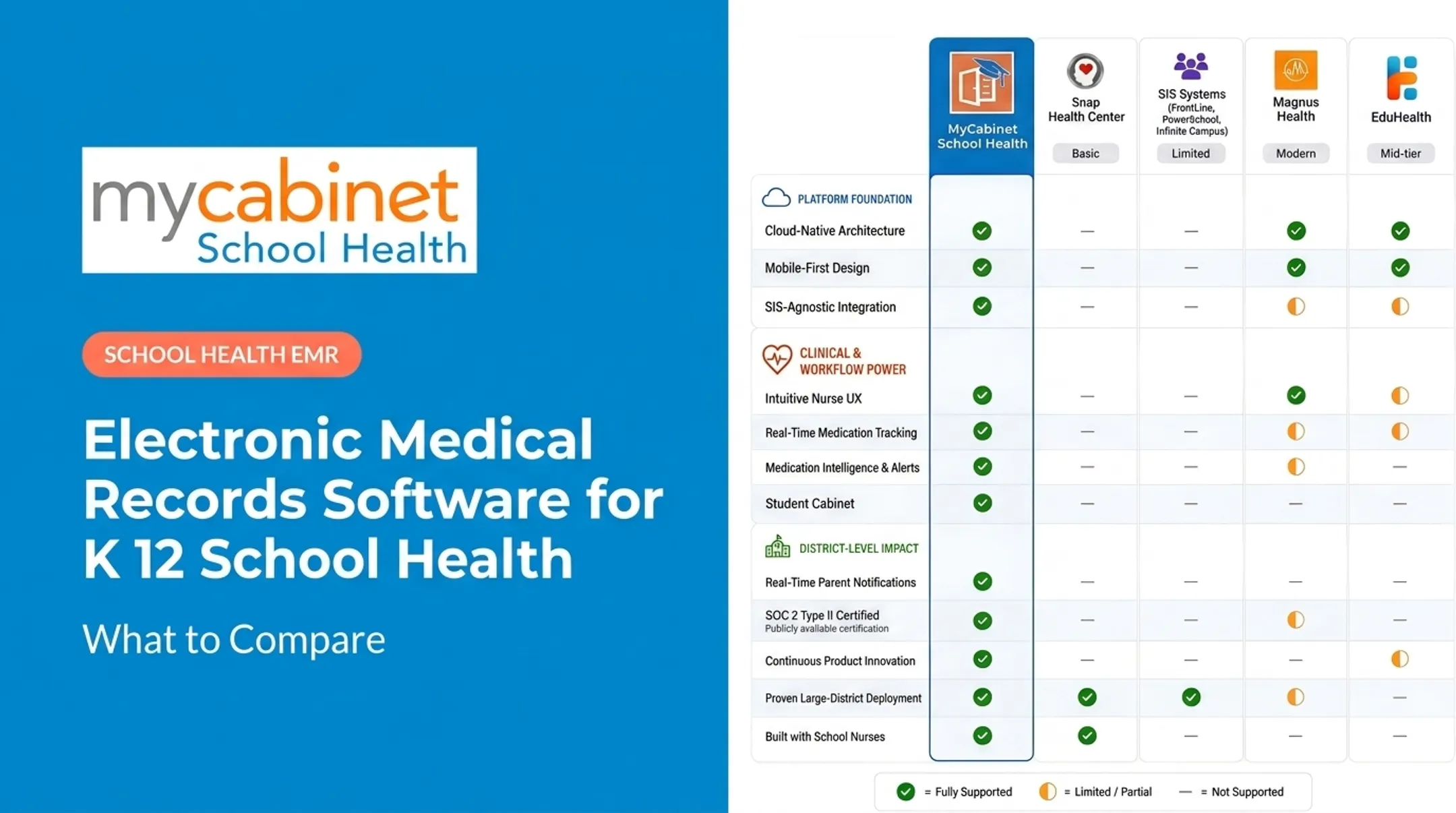
MyCabinet fits this top tier as a connected platform: a Nurse Portal paired with a Parent App so families can see clinic visits and medication activity in real time.
Support, training, and parent-app access are not always bundled. Confirm what each quote includes before you compare line by line.
Key Factors That Affect the Cost of School Health EHR Software
Five factors drive most school health EHR pricing: district size, feature depth, compliance posture, SIS integration, and implementation support. Here's how each one moves the number.
District Size and Number of Users
Per-student or per-nurse pricing scales with enrollment and the number of school sites you activate. A single-school pilot costs less in absolute dollars, but it often carries a higher per-student rate than a full district rollout. Vendors typically offer volume-based terms on larger contracts.
Feature Set and Parent Engagement Tools
A parent-facing app or web portal costs more than a staff-only system. Capabilities often priced above baseline charting include:
- Medication expiration tracking and dosage visibility
- Outreach logging and clinic-visit notifications
- Digital health-form collection with nurse review
- Real-time parent visibility into student care
Compliance and Security Requirements
FERPA- and HIPAA-aligned platforms, SOC 2 certification, and role-based access controls raise licensing and audit costs.
Most K–12 student health records fall under FERPA rather than HIPAA. Federal guidance from the Department of Education and HHS confirms HIPAA typically does not apply unless a non-FERPA provider transmits records electronically for a standard healthcare transaction. Ask vendors how they classify your data instead of accepting "HIPAA/FERPA compliant" as a blanket answer.
Integration with Student Information Systems (SIS)
Connecting health records to your existing SIS (like PowerSchool) or attendance system adds implementation cost. Ask vendors what data fields sync, how often, and who handles error resolution.
Implementation, Training, and Support
Training nurses and administrative staff takes time and often carries a separate line item. Build these into multi-year TCO:
- Onboarding and role-based training hours
- Helpdesk tier or included support hours
- Data migration and go-live assistance
- Ongoing renewals after the first year

Cost Breakdown of School Health EHR Software
The sticker price is only one line item. Here's the fuller picture districts should budget for:
| Cost Component | Timing | What It Covers |
|---|---|---|
| Initial licensing/subscription | Recurring (annual) | Base software access, usually per-student or per-district |
| Implementation & data migration | One-time | Moving paper/spreadsheet records into the new system |
| Training | One-time/periodic | Onboarding nurses, admin staff, and parents on app usage |
| Ongoing support & maintenance | Recurring | Helpdesk access, software updates, compliance updates |
| Add-on features | Recurring | Parent app access, advanced reporting, additional integrations |
Many school health vendors, including MyCabinet, list pricing as "available on request" with quotes customized per district. Before you sign, ask whether implementation, migration, and training are bundled or billed separately.
Low-Cost vs High-Cost School Health Software — What's the Difference?
The gap between basic recordkeeping tools and comprehensive nurse-parent-student platforms shows up in three places.
| Area | Lower-Cost | Higher-Cost |
|---|---|---|
| Workflow efficiency | Manual task tracking, limited automation; nurses rely on memory or paper lists | Intelligent task lists that surface incomplete visits, rechecks, and medication reminders |
| Parent communication | No parent-facing tools; nurses rely on email or phone calls | Dedicated parent app and web portal with controlled notifications for clinic visits and medication status |
| Compliance and security | Basic data storage, limited or no audit trails | FERPA-aligned access controls, structured audit trails, SOC 2 Type II certification |
MyCabinet, for example, adds color-coded task prioritization so nurses see what needs attention first.

The right choice depends on how much administrative time your nurses are currently losing to manual processes — not just which system costs less upfront.
How to Estimate the Right Budget for Your District
Your budget should reflect your district's actual priorities, not just the lowest quoted number. Consider:
- Map coverage to every school site and the full student count
- Quantify hours lost to paper forms, spreadsheets, and fax-based processes
- Decide whether parents need a full app or basic notifications
- Account for FERPA obligations and existing IT infrastructure constraints
- Budget for ongoing training and support your nursing staff will need
CoSN's total cost of ownership framework recommends budgeting across software, infrastructure/security, support and maintenance, training, and indirect staff labor — not just the license fee.

What Districts Often Miss When Budgeting for School Health Software
Even careful budgets have blind spots. Watch for these:
- Focusing only on per-student license fees without factoring in training and data migration costs
- Underestimating time saved (or lost) depending on how well the workflow actually fits nurse routines
- Overlooking parent communication tools — confirm whether they're included or billed as an add-on
- Choosing the cheapest system without testing nurse workflow fit or checking long-term platform reliability
None of these show up on a pricing page. They show up three months into implementation.
Conclusion
School health software costs vary based on district size, feature depth, and compliance needs. No single figure applies across the board. Understanding the full cost breakdown, not just the license fee, helps districts budget accurately and avoid mid-year surprises.
The right investment balances cost against nurse efficiency, parent communication, and compliance requirements. MyCabinet's nurse-centered, connected approach, pairing a Nurse Portal with a Parent App, is one model districts can evaluate when weighing these tradeoffs.
Frequently Asked Questions
What is the typical cost of electronic health record (EHR) software?
Clinical EHR pricing typically runs per-physician or per-practice. School health systems price differently — usually per-student or per-district — since workflows center on nurse visits and parent communication rather than billing.
How much does EHR software cost per month?
Monthly costs vary widely by deployment size and vendor. School platforms are often billed annually per student or per district rather than monthly per individual user, so ask vendors how their billing cycle actually works.
Is there a difference between an electronic health record and an electronic medical record?
Yes. HealthIT.gov defines an EMR as typically limited to one provider or practice, while an EHR spans multiple care settings. School health platforms function more like connected EHRs since parents and families have visibility too.
What features should K-12 schools prioritize when budgeting for health software?
Medication tracking, parent communication tools, and compliance features (FERPA alignment, audit trails) should top the priority list. These directly reduce nurse administrative burden and improve safety outcomes.
Are there hidden costs in school health EHR implementation?
Yes. Training time, data migration from paper or spreadsheets, and add-on features like parent apps or advanced reporting can all carry separate costs. Confirm what's bundled before signing a contract.
How can schools justify the cost of a new health records system?
Reduced administrative burden on nurses, improved medication safety through tracking and reminders, and better parent engagement through real-time visibility are the strongest justification points districts typically cite.